AI Image Generator FREE
Auto RepAI → Image Generator turns a text prompt into ready-to-use images and saves them straight into your media library.
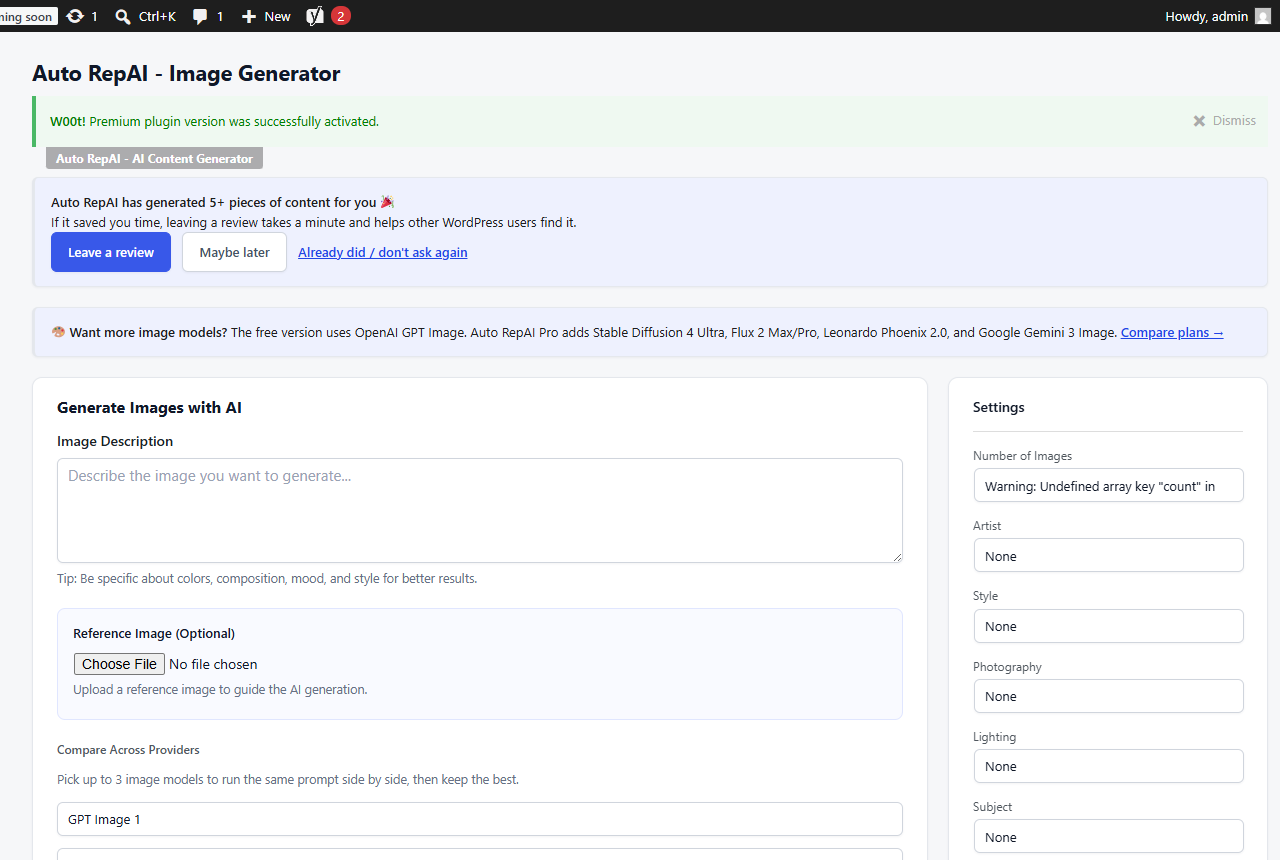
Step by step
- Describe the image. Concrete beats abstract: "top-down photo of a wooden desk with a laptop, coffee and a notebook, soft morning light".
- Pick a model — GPT Image variants in free; Pro adds Stable Diffusion 4 Ultra, Flux 2 (Max/Pro/Flex), Leonardo Phoenix and Gemini image models to the same screen.
- Choose size, style (realistic, digital art, illustration, minimalist, artistic) and count (1–6).
- Optional: upload a reference image to guide the composition (uses OpenAI's image-edit endpoint).
- Click Generate Image, then Save to Media Library on the results you like.
Prompt defaults
The Set as Default panel stores your house style — artist direction, lighting, camera, composition, resolution, color notes — and applies it to every future prompt so your images stay on-brand.
Where images get used
- As featured images from the Content Generator's featured-image switch.
- Pro Automations can attach AI images — or royalty-free stock photos (Pexels/Pixabay with your own free keys) — to scheduled posts automatically.
Alt text matters
After inserting images, run the Image Alt Text Scanner — images without alt text hurt accessibility and image SEO.